Shop for a keyboard lately and you’ve hit the great divide: mechanical versus membrane, with mechanical usually painted as the obvious upgrade. It’s more even than that. The two run on genuinely different technology, each with real strengths, and the right pick depends on how you type, where you type, and what you’re willing to spend. Here’s how each one works and where the trade-offs actually fall, no assumption that you need the enthusiast toy.
How the two technologies work
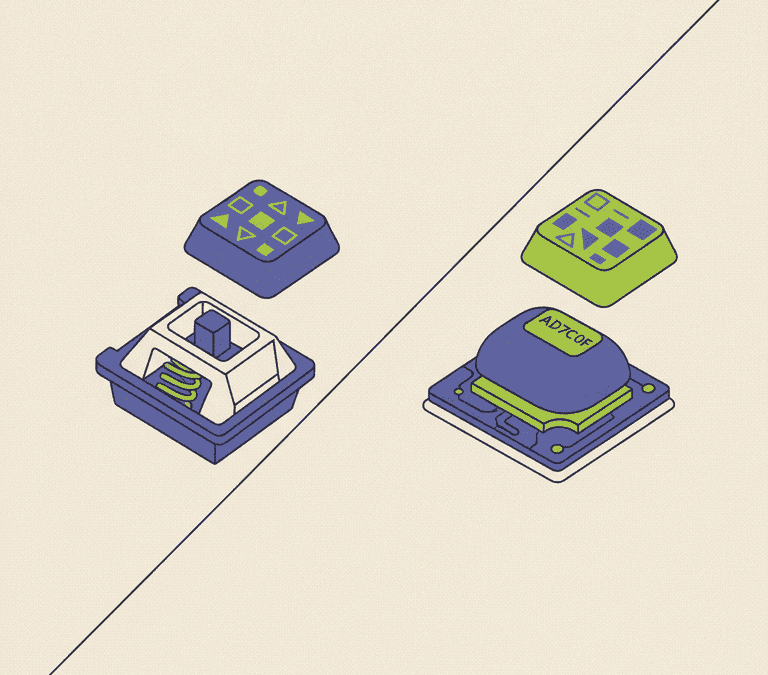
A membrane keyboard registers a press by pushing a key down onto a flexible layer, usually a rubber dome sitting over a printed circuit sheet, until two contacts meet and close the circuit. One continuous layer runs under every key. This is what’s inside the overwhelming majority of cheap and bundled-in keyboards, and most laptop keyboards are a close relative. It’s cheap to build, quiet, and light.
A mechanical keyboard gives every key its own discrete switch, a small spring-loaded mechanism that registers the press by itself. Because each switch is a self-contained part, the typing feel stays consistent across the whole board, keys can register before they bottom out, and one dead switch can often be replaced instead of dooming the entire keyboard. That construction is the source of nearly everything people care about here.
How they feel under your fingers
Feel is why most people switch, and it’s also the hardest thing to put into words. Membrane boards tend to feel soft and a little mushy, because you’re pressing through a rubber dome that compresses gradually and the key usually has to travel all the way down to register. Some people find that perfectly comfortable. Others find it vague, because the moment of actuation never feels crisp.
Mechanical switches give you a sharper, more defined sensation, and crucially they come in distinct families, so you pick the character you want:
- Linear switches glide top to bottom with no bump, favored by people who want a clean, uninterrupted press.
- Tactile switches add a noticeable bump right where the key registers, handing you feedback without making you bottom out.
- Clicky switches add that bump plus an audible click. Deeply satisfying to some, genuinely intolerable to anyone sharing the room.
The point is that mechanical isn’t one feel. A linear board and a clicky board are wildly different machines, so the switch type matters far more than the word stamped on the box.
Noise, durability, and repair
Noise is often the whole decision in a shared space. Membrane boards are generally quiet, which keeps the peace in open offices, bedrooms, and on video calls. Mechanical boards run the gamut from nearly silent linears to loud clickers, and even a quiet mechanical usually makes more sound than a membrane unless it’s been deliberately dampened.
Durability leans mechanical. Individual switches are commonly rated for a very high number of keystrokes, and because the parts are discrete, a worn or broken switch can sometimes be swapped rather than retiring the board. Membrane keyboards can be perfectly reliable too. But when the dome layer wears out or a key starts dropping inputs, the realistic fix is to replace the whole thing. On a cheap board that’s no tragedy. It just means you bought a consumable, not a long-term tool.
Price, weight, and customization
Price is where membrane keeps its strongest argument. These boards are cheap to produce and own the budget end of the market, which makes them the sensible call for a spare machine, a shared family computer, or anyone who simply doesn’t type enough to justify spending more. Mechanical boards start higher and climb fast once you stack on features, though entry-level mechanicals have gotten far more affordable than they used to be.
Two more practical gaps are worth flagging. Membrane boards are usually lighter and thinner, handy if you cart a keyboard around or want a slim profile on the desk. Mechanical boards tend to be heavier, partly because the heft helps them stay planted and feel stable under hard typing. And mechanical opens a door membrane simply can’t: customization. Many let you swap keycaps for a different look or feel, and some let you replace switches entirely without soldering. If tinkering appeals to you, that’s a real draw. If you just want something that works out of the box, it’s noise.
How to choose
Skip the reflex to grab whichever type has the better reputation. Match the keyboard to your situation instead:
- Go membrane if budget leads, you need quiet in a shared space, you want something light and low-profile, or it’s for occasional or secondary use.
- Go mechanical if you type for hours a day, you care about feel and want to pick a specific switch character, you value longevity and being able to repair a single key, or you want to customize over time.
- Either works for gaming. Mechanical boards are popular with gamers for their consistent feel and durability, but a decent membrane is entirely playable. The gap matters less than the marketing wants you to believe.
One more thing: if you possibly can, type on a board before you buy, or at least buy from a seller with a fair return policy. Feel is personal. Switch preferences swing hard from person to person, and a keyboard one reviewer adores may not suit your hands at all.
So which one wins
Mechanical keyboards earn their following with better feel, longer life, and the freedom to customize, and for heavy daily typists they’re usually worth the premium. But membrane isn’t a downgrade so much as a different set of priorities: cheaper, quieter, lighter, which is exactly right for plenty of people in plenty of rooms. Decide on how much you type, how much noise you can get away with, and how much you want to spend, and let the switch type, not the label, make the final call.